xPal today announced the official launch of the Secure Messaging App for Desktop, bringing its identity-free, zero-data encrypted communication platform to Windows, macOS, and web browsers for the first time. The launch marks the first time xPal’s full end-to-end encryption chat experience, including all proprietary privacy tools, is available natively on a laptop or desktop computer, fully synced with the existing mobile app.
Continuing from that idea, think about the last conversation you had that genuinely needed privacy. A call with a lawyer, a source sharing information that could put their career at risk, or a business negotiation where a single leak could have completely changed the outcome.
Where were you? Probably at a desk.
xPal, the secure messaging app for desktop, lets you communicate globally without a phone number, email address, or real name on the screen where the serious work actually gets done.
A Bigger Keyboard Doesn’t Change the Privacy Rules
Nothing about how xPal protects your communication changes on the desktop. You still register with a username and a PIN. You still get a 9-digit xID, your private, identity-free anonymous messaging number that works anywhere in the world without country codes or area codes. You still send messages that xPal cannot read, store, or hand over to anyone, because xPal never has them.
What changes is how you interact with all of it. Longer messages deserve a real keyboard. Video calls deserve a proper screen. Group chats with up to 100 people are easier to follow when you are not scrolling on four inches of glass.
How Fast Can You Set Up the xPal Desktop Secure Messaging App?
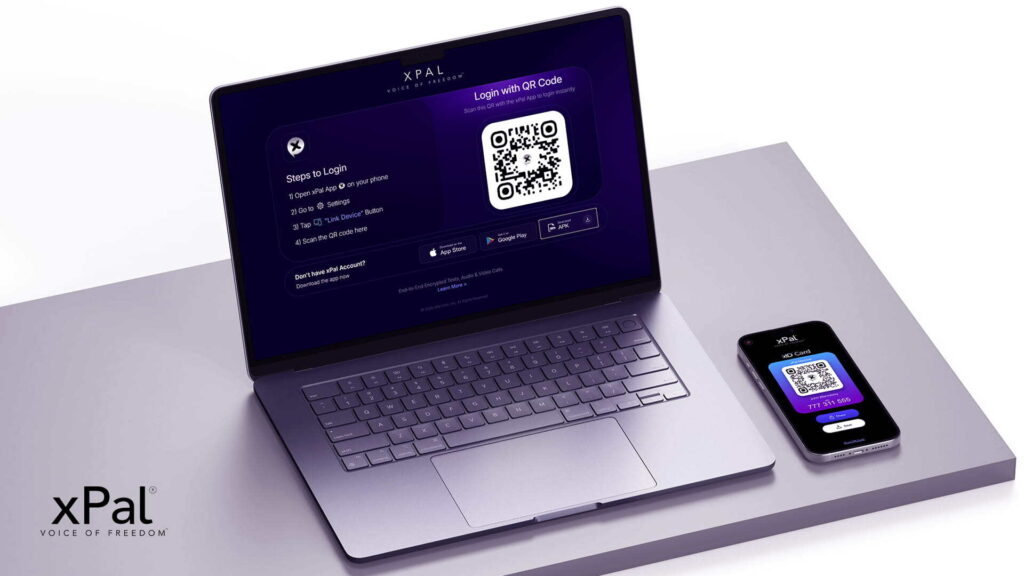
If you already have xPal on your phone, linking your desktop takes a single QR code scan; this is cross-device messaging at its most frictionless. Your conversations appear in real time on both devices from that moment forward. New messages land on whichever screen you are looking at. There is no cloud account to set up, no password reset to navigate, and no consent to give for data migration because no data migrates. Everything stays on your devices.
The secure messaging app for Mac and Windows versions is built on the same encrypted architecture as the mobile app.
New to xPal? Registration on the desktop takes under a minute. Username. PIN. Done. Your xID is assigned immediately.
Does the xPal Server Store Your Company’s Conversations?
No, xPal does not permanently store any communication on its servers, making it a genuine data privacy communication solution and a private messaging app for business communication. Messages are deleted from xPal servers the moment they are delivered. If a message has not been delivered within 36 hours and if the recipient was offline, it is deleted anyway, in encrypted form, permanently. There are no server-side archives. There is no database of your company’s conversations that a subpoena could reach.
For legal teams, for compliance teams, for any business that handles information that should not live on someone else’s server: xPal’s approach means the risk simply does not exist, making it an incredible privacy-first team communication platform. You can’t subpoena what is not stored.
How Does the xPal Desktop App Secure Messages?
The xPal desktop app protects conversations using AES-GCM (Advanced Encryption Standard – Galois/Counter Mode), an authenticated encryption algorithm widely used to provide both confidentiality and integrity.
AES-GCM encrypts every message while also detecting unauthorized modifications during transmission. If message data is altered, the integrity verification fails, preventing tampered content from being accepted.
Unlike encryption methods that focus only on confidentiality, AES-GCM also authenticates the encrypted data, making it suitable for secure messaging applications where message integrity is equally important.
What Features Does the xPal Desktop App Include?
On desktop, the same privacy tools available on mobile remain unchanged.
On xPal Secure Messaging App for Desktop, these privacy features become easier to manage during real work and operate across desktop conversations and file sharing, bringing the same control over end-to-end encryption chat, media, and communication history to larger-screen workflows.
Flicker™ Mode allows temporary conversations to disappear automatically even while working across multiple chats and documents. Terminate™ lets users remove an entire conversation from both sides directly from the desktop. Total Wipeout™ can instantly erase communication history across linked conversations, while Photo & Video Sanitizer™ removes hidden metadata from files before they are shared from the computer.
On top of all, xPal’s encryption has been validated under the NIST Cryptographic Algorithm Validation Program. DEKRA, one of the most respected independent security testing organizations in the world and an official Google security partner, has audited and certified the platform for three consecutive years. The App Defence Alliance CASA program returned a clean pass in every testing category.
Those validations cover the xPal desktop app in full.
Which Cryptographic Technologies Does the xPal Desktop App Use?
The xPal desktop app combines multiple cryptographic components to establish secure communication.
Message encryption uses AES-GCM, while encryption keys are generated using Elliptic Curve Diffie-Hellman (ECDH). ECDH enables two devices to establish a shared secret without transmitting encryption keys across the network.
Each linked device generates and maintains its own encrypted key material. Keys are never shared directly between devices, reducing the risk of exposing encryption credentials across multiple endpoints.
For local protection, encryption keys remain stored securely on each device. On iOS, they are protected by the Apple Keychain, while Android devices use Android Keystore and Secure Storage.
How Does the xPal Desktop App Synchronize Across Devices?
The xPal desktop app synchronizes conversations between desktop and mobile devices using WebRTC and WebSocket technologies.
When the desktop application starts, it establishes a secure socket connection that generates a unique session identifier. This identifier is converted into a QR code displayed on the desktop.
After scanning the QR code from the mobile application, both devices establish a secure communication channel. Once paired, messages, conversations, and supported media synchronize in real time through persistent WebSocket communication.
The pairing process typically completes within seconds without requiring usernames, passwords, or complicated manual configuration.
How Does QR Device Linking Work?
Device linking begins with a temporary session created by the desktop application.
The generated QR code contains a unique session identifier rather than conversation data. After scanning the QR code with the mobile application, both devices authenticate the session and establish encrypted communication channels for synchronization.
This approach allows users to securely connect desktop and mobile devices without manually exchanging credentials while maintaining encrypted communication throughout the pairing process.
Where is the xPal Desktop App Available?
The xPal desktop app is a free download at xpal.com for Windows and macOS. The web version runs in any modern browser with nothing to install. Gold membership, which adds unlimited video calling and advanced features, is available monthly or yearly through the app.
Private communication has always deserved a bigger screen. It finally has one in the xPal secure messaging app.